

Beginner’s Guide to Choosing the Right Cash Register Ribbon
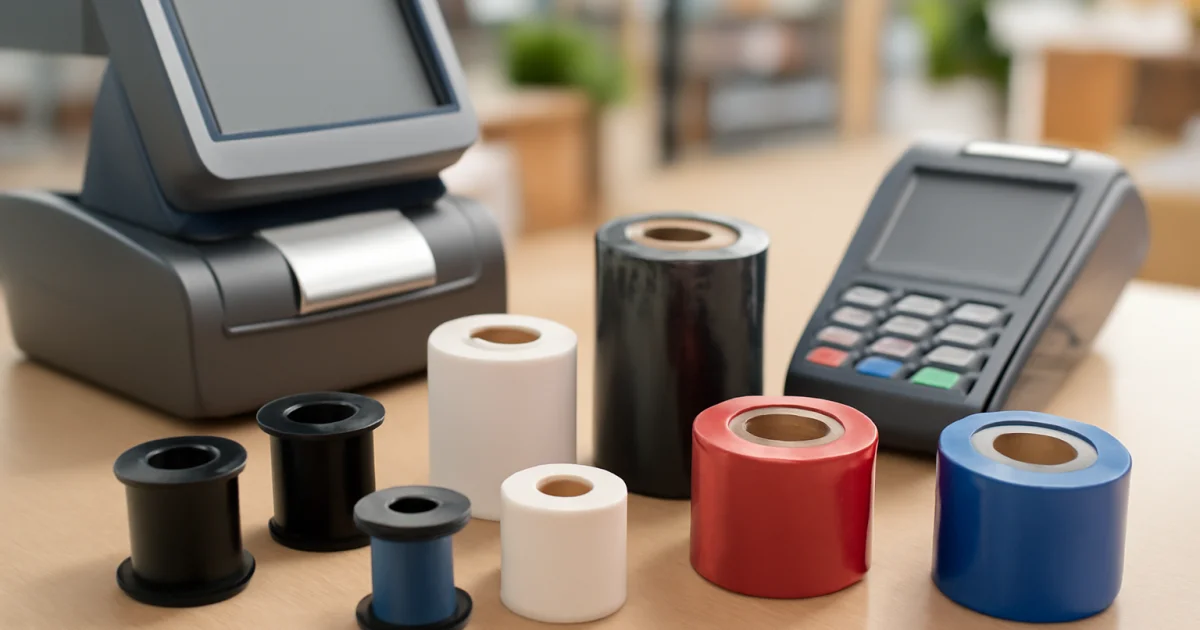
Efficient business operations depend on reliable point-of-sale (POS) systems, and one often-overlooked component is the cash register ribbon. Whether you run a retail store, supply POS equipment, or manage office machinery, understanding how to select the proper ribbon can save money, prevent downtime, and ensure crisp print quality. This comprehensive beginner’s guide walks you through every step of choosing the right cash register ribbon for your needs.
Understanding Cash Register Ribbons: What They Are and Why They Matter
A cash register ribbon is a specially designed inked strip used in impact printers and POS machines to produce printed receipts, transaction records, or reports. Unlike modern inkjet or laser printers, many cash registers and POS systems still rely on ribbon technology due to its simplicity, reliability, and cost-effectiveness. Selecting the correct ribbon ensures clear printouts, prevents jamming, and prolongs the life of your equipment.
Types of Cash Register Ribbons: Key Variations Explained
Not all ribbons are created equal. Cash register ribbons come in several formats, each suited to specific machines and applications. Understanding these types helps you make an informed choice:
- Spool Ribbons: These are wound onto one or two spools and are commonly used in older cash registers, adding machines, and calculators. Learn more about spool ribbons and their uses.
- Cartridge Ribbons: Encased in a plastic cartridge for easy installation and removal, these are popular in modern POS systems and printers.
- Roll Ribbons: Designed for continuous feed, often used in movie ticket printers, time clocks, and some POS devices.
- MICR Ribbons: Special ribbons with magnetic ink for printing secure banking documents such as cheques.
The right format depends on your equipment’s design and printing requirements.
How to Identify Your Cash Register Ribbon Needs
Before purchasing, it’s crucial to determine the exact ribbon your equipment requires. Here are the key steps:
- Check Your Machine Model: Refer to your cash register, POS, or calculator’s manual or label for the model number. Most manufacturers specify compatible ribbon types and part numbers.
- Review Existing Ribbon Packaging: If you have an old ribbon or packaging, check for specifications such as size, colour, and type.
- Measure the Ribbon: If documentation is unavailable, measure the width and length of the existing ribbon or spool to match with replacements.
- Consider Printing Needs: Think about your average daily print volume and whether you need special features like two-colour (black/red) ribbons or MICR capability.
Accurate identification prevents ordering the wrong supplies and avoids costly downtime.
Material Choices: Nylon, Fabric, and Beyond
Cash register ribbons are typically made from materials like nylon, polyester, or other fabrics which hold ink and withstand repeated impacts. Here’s how they differ:
- Nylon Ribbons: The most common type, offering good durability, sharp print quality, and affordability. Suitable for most POS and cash register applications.
- Fabric Ribbons: Sometimes used in specialty applications or older machines. They may provide a softer print and longer life.
- Specialty Ribbons: MICR ribbons for banking or thermal transfer ribbons for barcode and label printing, each designed for specific use cases.
The material impacts print clarity, longevity, and cost-effectiveness. For high-volume retail or banking, investing in the correct ribbon material can make a noticeable difference in performance.
Colour Options and Their Uses
The standard ribbon colour is black, but some businesses benefit from alternative options:
- Black: The most common, suitable for general receipts and reports.
- Red/Black (Two-Colour): Used for highlighting negative values, refunds, or special entries. Some cash registers support two-colour printing for improved visibility.
- Special Colours: Occasionally required for branding or specialised applications, such as blue for certain documents.
Choosing the appropriate colour is important for clear communication on receipts and records.
Printer Compatibility: Avoiding Costly Mistakes
Printer and ribbon compatibility is essential. Using the wrong ribbon can lead to poor print quality, equipment malfunctions, or even damage. To ensure compatibility:
- Always match the ribbon type (spool, cartridge, roll) to your machine’s requirements.
- Check dimensions, including width, length, and any notches or guide holes.
- If in doubt, consult your equipment dealer or manufacturer for recommended supplies.
- Consider sourcing from a reputable manufacturer with a broad compatibility catalogue, such as Omnimetric Technologies, which offers ribbons for a wide range of POS and office equipment.
Consistent quality and compatibility not only improve performance but also extend the lifespan of your cash register or POS printer. For more details about printer compatibility, visit the Dot Matrix Printer Ribbon page or MICR Ribbon product page.
When to Choose OEM, Compatible, or Private-Label Ribbons
Buyers often face a choice between Original Equipment Manufacturer (OEM), compatible, or private-label ribbons:
- OEM Ribbons: Made by the original equipment brand, guaranteeing perfect fit and performance but often at a premium price.
- Compatible Ribbons: Produced by third-party manufacturers to meet or exceed OEM standards, offering similar performance at lower cost. Quality varies, so source from trusted suppliers.
- Private-Label Ribbons: Custom-manufactured ribbons under your own brand, ideal for distributors or businesses seeking unique branding and packaging.
For most retail stores and POS system suppliers, quality compatible ribbons offer excellent value. Wholesalers and importers may benefit from private-label manufacturing to reinforce their brand identity.
Specialty Ribbons: MICR, Correction, and Thermal Transfer
Some applications require specialty ribbons:
- MICR Ribbons: Used in banking and financial organisations for cheque and document processing. These contain magnetic ink for machine reading and security.
- Correction Ribbons: Designed for typewriters and certain POS systems, allowing users to correct errors without replacing the whole ribbon.
- Thermal Transfer Ribbons: Used in barcode and label printers for inventory, logistics, and industrial applications. These ribbons transfer ink onto labels via heat and are available in wax, wax-resin, or resin formulations. Find out more about thermal transfer ribbons.
Choosing the right specialty ribbon depends on your equipment and industry requirements. For example, if you need precise barcode labels for inventory, a resin-based thermal transfer ribbon may be best. If processing cheques, a MICR ribbon is essential.
How to Assess Ribbon Quality: What to Look For
Not all ribbons deliver the same results. Here’s what separates high-quality ribbons from subpar options:
- Print Clarity: Consistent, dark, and legible printouts without smudging or fading.
- Durability: Ribbons should withstand high-volume printing without frequent replacement.
- Clean Operation: No excessive ink dust, leaking, or ribbon fraying during use.
- 100% Inspection: Look for manufacturers who inspect every ribbon before shipment, such as Omnimetric Technologies, to ensure reliability.
Investing in quality reduces maintenance costs and improves customer experience at the point of sale.
Practical Examples: Matching Ribbon to Real Business Needs
Let’s look at practical scenarios to see how correct ribbon selection matters:
- Retail Store: A small supermarket uses a popular POS system requiring a cartridge ribbon. The owner chooses a compatible black ribbon from a trusted supplier to ensure clear receipts and cost savings.
- Bank: A cheque-processing department selects MICR ribbons to meet security and regulatory needs. They work with a manufacturer specialising in banking ribbons to ensure compliance.
- Barcode Printing Firm: A logistics company running thermal printers opts for wax-resin thermal transfer ribbons for product labels, ensuring durability against abrasion during shipping.
- Office Equipment Dealer: A dealer offering typewriters and calculators stocks a range of spool ribbons and correction ribbons, meeting diverse client requirements.
Each scenario demonstrates how understanding ribbon types, applications, and sources can make business operations smoother and more cost-effective.
Common Mistakes to Avoid When Selecting Cash Register Ribbons
Even experienced buyers can make mistakes when choosing ribbons. Here are some of the most frequent errors, and how to avoid them:
- Assuming All Ribbons Are the Same: Differences in width, length, material, and ink formulation can affect performance and compatibility. Always check specifications instead of assuming one size fits all.
- Overlooking Manufacturer Recommendations: Ignoring guidance in the user manual or from the equipment supplier can lead to poor fit, subpar print quality, or equipment wear.
- Prioritising Price Over Quality: Cheaper ribbons may seem attractive, but low-quality products can cause jams, wear out quickly, or produce faint printouts. Consider total cost of ownership, not just purchase price.
- Neglecting to Test Before Bulk Purchase: Always order a sample or test batch before committing to large orders, especially when working with a new manufacturer or supplier.
- Not Accounting for Environmental Conditions: High humidity, temperature extremes, or dust can affect ribbon performance. Choose ribbons rated for your operating environment.
By being aware of these common pitfalls and taking proactive steps, you can avoid unnecessary expense, frustration, and downtime.
Step-by-Step Checklist for Cash Register Ribbon Selection
- Identify your printer or POS model and record the recommended ribbon type and part number.
- Determine the required ribbon format (spool, cartridge, roll, MICR, etc.).
- Measure the dimensions of your current ribbon if you lack documentation.
- Assess your daily print volume and any special requirements, such as colour or security features.
- Research reputable suppliers who offer quality assurance, compatibility guarantees, and after-sales support.
- Order a sample or small quantity for testing before making a larger purchase.
- Review print clarity, ribbon lifespan, and ease of installation during your test phase.
- Keep detailed records of orders, suppliers, and feedback for ongoing procurement improvement.
This checklist ensures a thorough, reliable process when choosing ribbons for your business, reducing errors and improving outcomes.
Beyond the Basics: Advanced Considerations for Large-Scale Operations
For businesses managing multiple locations or high-volume operations, cash register ribbon procurement and inventory management require additional planning:
- Centralised Inventory Tracking: Use inventory management software to monitor ribbon usage, anticipate demand spikes, and avoid stockouts or overstocking.
- Supplier Relationships: Establish long-term partnerships with trusted manufacturers or distributors. Negotiate bulk pricing, priority support, and custom solutions where possible.
- Standardisation: Where feasible, standardise on a limited range of compatible ribbon types across locations to simplify ordering and reduce errors.
- Staff Training: Train staff on proper ribbon installation, troubleshooting, and maintenance to prevent equipment damage and extend the life of your POS systems.
- Compliance and Security: For regulated industries, ensure ribbons meet relevant standards (such as MICR compliance for banking or ISO certifications for manufacturing).
Advanced planning and standardisation help large businesses control costs, minimise risk, and support uninterrupted operations.
Real-World Scenario Analysis: Upgrading Ribbon Strategy
Consider a regional retail chain with a mix of legacy registers and new POS terminals. By conducting a ribbon audit, the chain discovers that some stores use outdated or incompatible ribbons, leading to frequent jams and faded receipts. After standardising on a compatible, high-quality ribbon manufacturer and implementing a central ordering system, the chain reduces supply costs by 15%, improves print consistency, and cuts downtime in half. This scenario illustrates how reviewing and upgrading your ribbon strategy can deliver measurable business benefits.
Buying Tips: How to Order the Right Cash Register Ribbon
Follow these proven tips to simplify your next ribbon purchase:
- Keep a record of your machine models and compatible ribbon types.
- Order in advance to avoid running out, especially during busy periods.
- Consider buying in bulk from reputable manufacturers for better pricing.
- Where possible, work directly with manufacturers offering OEM, compatible, and private-label options for flexibility and customisation.
- Ask about quality certifications (such as ISO 9001/14001), especially for high-volume or regulated environments.
- Ensure the supplier provides after-sales support and clear product information.
For additional insights on the significance of cash register ribbons, check out this in-depth article.
Conclusion: Making the Right Choice for Your Business
Choosing the right cash register ribbon is about more than just price. It’s about ensuring compatibility, print clarity, machine longevity, and business continuity. Take time to identify your equipment, understand your printing requirements, and partner with a manufacturer that can provide quality, compatibility, and support tailored to your needs. Whether you operate a single retail outlet or supply consumables to businesses across regions, the right ribbon choice can make a tangible difference in daily operations and customer satisfaction.
Frequently Asked Questions
How do I know which cash register ribbon my POS system needs?
Check your POS system’s manual or the label on the machine for the compatible ribbon model or part number. If unavailable, refer to the previous ribbon’s packaging or measure its dimensions. When in doubt, contact the equipment supplier or a reputable ribbon manufacturer for guidance.
What is the difference between spool ribbons and cartridge ribbons?
Spool ribbons are wound onto one or two spools and are common in older machines like cash registers and calculators. Cartridge ribbons are enclosed in a plastic case, making them easier to install and remove, and are often used in newer POS systems and printers.
Are compatible ribbons as good as OEM ribbons?
High-quality compatible ribbons from reputable manufacturers can match OEM ribbons in performance, durability, and print quality—often at a lower cost. Always source from trusted suppliers who guarantee compatibility and quality.
What is a MICR ribbon and when do I need one?
A MICR ribbon contains magnetic ink for printing secure documents like cheques. You need a MICR ribbon if your business processes cheques or financial documents that must be machine-readable and compliant with banking standards.
Can I use a thermal transfer ribbon for printing on rubber labels?
Yes, thermal transfer ribbons—especially resin or wax-resin types—can be used for printing on rubber labels and other specialty surfaces. Ensure the ribbon matches your printer type and is suitable for the material you’re printing on.
Ready to Order the Perfect Cash Register Ribbon?
Omnimetric Technologies is your trusted partner for all types of cash register ribbons, spool ribbons, MICR ribbons, thermal transfer ribbons, and more. With ISO-certified manufacturing, extensive compatibility, and custom OEM/private label solutions, we help you keep your business running smoothly. Contact us today to discuss your requirements or request a sample—let us support your success with quality you can rely on!